Archive for the ‘HowTos’ Category.
30. August 2013, 11:52

instantOLAP uses an extremely fast internal database system to store its dimensions, stores, caches and other information on the harddisk. Though the performance is good enough for the very most situations, you can even boost it by changing some server settings, depending on your server memory, harddisk, operating system or Java version.
This small HowTo addresses the administrator of your system and shows how, and where, to change the settings if you need more performance for your dimensions and stores. Continue reading this article and boost your system.
Continue reading ‘Tuning disk access in instantOLAP’ »
11. August 2010, 17:36
instantOLAP contains a flexible GEO chart engine which allows to present your OLAP data as colorful maps with custom texts, color codings, icons and other visualizations in multiple layers.
[youtube uw-4UDKpTyA 600 400]
This (video) tutorial shows how to create GEO charts, starting with a simple background layer. Watch the video or continue reading to learn more about maps in instantOLAP.
Continue reading ‘Turn OLAP data into Geo Charts’ »
8. Juli 2010, 22:20
The built in Offline Stores in instantOLAP allow to aggregate the classical cubes fully or partwise into light speed local data stores. With Offline Stores, you can realize all modern forms of OLAP storage: ROLAP (direct access to relational databases when querying data), MOLAP (fully aggregated cubes with high performance) or HOLAP (a hybrid mixture of both).
Continue reading ‘OLAP Cube, ROLAP, MOLAP, HOLAP: How to use Stores’ »
20. Januar 2010, 23:36
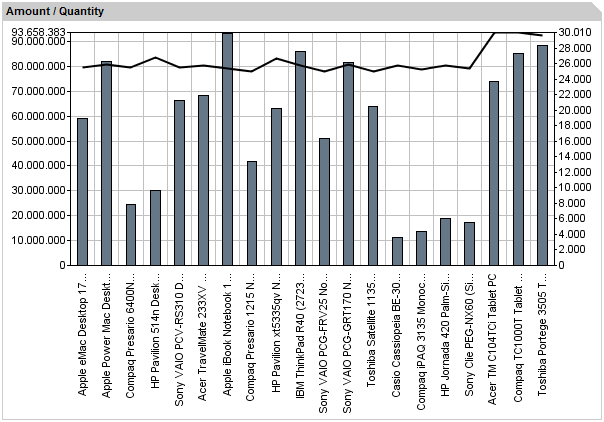
We’ve been asked how to realize an overlay chart and how to place multiple ranges inside a single chart, so this article will show, using a simple example, how to do this.
Continue reading ‘Overlay charts’ »
18. Januar 2010, 15:12
Before you can connect a database server with instantOLAP or any other Java application, you need a to install a matching database driver. For Java systems, you will need a driver which implements the Java JDBC standard and almost all database vendors provide a JDBC driver for their product.
Because of copyright reasons, only a few drivers are included in the instantOLAP standard distribution (an open source driver for Sybase and Microsoft SQL-Server and a second driver for HSQLDB databases). For all other database servers, you can find the driver in the internet. This is a list of the common database servers and some internet addresses where to find the driver.
Continue reading ‘JDBC drivers’ »
24. August 2009, 19:11
There is an almost unknown tool within every instantOLAP installation, the instantOLAP Console, which allows to remote-control your instantOLAP server and to start, stop or rebuild models, to rebuild single dimensions or cubes or to perform a number of other operations.
The tool is very useful whenever instantOLAP loads its data from a data-warehouse and you want to rebuild certain models, dimensions or cubes after the ETL tool rebuild the warehouse or added new data to it.
This article describes, how to use the tool from batch-files or other Java applications (most ETL tools can call native Java commands) and which operations are available.
Continue reading ‘Remote control your OLAP server’ »
12. August 2009, 19:02
 Of course, you could just download the new installer of instantOLAP and install the application in the same path again. But this has a number of disadvantages: 1. The download of the complete installation is much larger, 2. all of your personal settings in the server or for the instantOLAP would get lost and 3. the demo reports and the access rights and some other repository elements will be re- or overwritten with its original state again.
Therefore, this article describes, how to update instantOLAP when using the Apache Tomcat application server with some easy steps. The Tomcat server is included in the standard distribution of instantOLAP.
Continue reading ‘How to update instantOLAP in Apache Tomcat’ »
15. Dezember 2008, 15:59
Some of our customers asked how to implement access rules (for dimensions and keys) based on data stored in their database. This is useful e.g. for sales information systems where sales representives only may see customers of the region they are responsible for and if this representive/region relationship is stored in the database.
Continue reading ‘Implementing data-based user access rules’ »
5. Dezember 2008, 15:37
Because instantOLAP is usable as „adhoc“ ROLAP tool, there is a maximum complexity for reports and a maximum number of loadable cube cells. When using adhoc-cubes, the system has to determine where to load which data from and which data is needed to populate the result or to calculate formulas.
Continue reading ‘„Query too complex“?’ »
